Why people look for a Grammarly alternative on Mac
Grammarly is good at what it does. People who look elsewhere usually have one of four reasons:
- Price. Grammarly’s paid plans are subscriptions. Its US Mac App Store listing shows in-app purchases of $29.99 a month, $59.99 a quarter, or $139.99 a year (as of October 2026). Web prices vary by country, so check Grammarly’s plans page for yours.
- Privacy. Grammarly calls itself “an online application”: your text goes to its servers to be checked. On individual plans, its product improvement and training setting starts switched on. We explain what that means in Is Grammarly safe for work?
- Apple caught up. macOS 27 proofreads as you type on Apple silicon Macs, so some people no longer need a second checker.
- A different kind of help. Some people want plain grammar fixes with no AI drafting. Others want to choose the AI model that does the work.
Note: You may see the name Superhuman on Grammarly’s site and App Store listing. Grammarly’s parent company renamed itself Superhuman in October 2025; Grammarly is still the product’s name.
Grammarly alternatives for Mac at a glance
Features and prices as of October 2026. “On demand” means you select text and ask for a fix; nothing is checked in the background.
| Option | How it checks | Works offline | Cost |
|---|---|---|---|
| Grammarly (for reference) | Suggestions as you type, on Mac, Windows, phones, and the web | No, it needs an internet connection | Free plan with 100 AI prompts a month; paid subscriptions |
| Apple Writing Tools and macOS 27 proofreading | As you type on macOS 27; Writing Tools on selected text | Partly: some requests use Apple’s Private Cloud Compute | Free on a Mac with M1 or later |
| macOS spelling and grammar | Red and blue underlines as you type | Yes | Free on every Mac |
| LanguageTool | As you type in Mail, Messages, Notes, and a few more; a shortcut elsewhere | Advanced checks need internet | Free Basic plan; paid Premium |
| ProWritingAid | In Word, Scrivener, Pages, and other writing apps | Not stated; you must sign in | Free plan; Premium as a subscription or lifetime purchase |
| Harper | As you type, in text fields across macOS (beta) | Yes | Free and open source |
| A local AI model | On demand, in a chat window | Yes, once the model is downloaded | Free |
| MacWriteBuddy (ours) | On demand: select text in any app, press ⌃⌥G | Yes, with a local model | Grammar fixes free; Pro is $39 once |
Tip: On an Intel Mac? Apple Intelligence needs M1 or later, and macOS 27 doesn’t run on Intel. Grammarly (Intel Macs from 2018), Harper Desktop, Ollama, and MacWriteBuddy all still work. Our guide to Apple Intelligence on Intel Macs covers the details.
Free Grammarly alternatives built into your Mac
1. Apple Writing Tools and proofreading as you type
If your Mac has an M1 chip or later, you may already have all the checker you need. Apple says that with macOS 27, Apple Intelligence “automatically proofreads for users as they type across the system”. MacStories’ review describes blue underlines that can take a few seconds to appear. Select text and open Writing Tools to Proofread, Rewrite (Friendly, Professional, or Concise), or Summarize. Apple says Writing Tools work in “most places you write, including third-party apps and websites.”
Limits: it needs a Mac with M1 or later and one of 16 supported languages, with your Mac and Siri set to the same one. It isn’t available on Macs bought in mainland China. Apple says server-side features have daily usage limits, and that expanded access will cost a fee in the future. Our guide to Apple Intelligence Writing Tools covers setup, a keyboard shortcut, and what to do when it’s missing.
2. The macOS spelling and grammar checker
Every Mac, Intel included, has the classic checker: misspelled words get a red underline and grammar problems a dotted blue one. In most apps, choose Edit › Spelling and Grammar to check a whole document or turn on Check Grammar With Spelling. Next to Grammarly it’s basic, with no rewrites or tone advice, but it’s free and always there. See how to spell check on a Mac for the details.
Grammarly alternatives you can install
3. LanguageTool
LanguageTool is the natural pick if you write in more than one language: it says it checks “over thirty languages”. Its Mac app underlines mistakes as you type in Apple Mail, Messages, and Notes, with Word, Slack, and Teams in beta. In other apps, a shortcut sends your text to its editor. LanguageTool says you can use the Mac app without an account, and it also has apps for Windows and iOS.
Cost: a free Basic plan and a paid Premium plan. Its pricing page didn’t show prices when we checked in October 2026, so look there for your country. Keep in mind: advanced checks need an internet connection, so your text goes to LanguageTool’s servers.
4. ProWritingAid
ProWritingAid leans toward long-form writing and in-depth editing reports. Its Mac app, Desktop Everywhere, works “directly in MS Word, Scrivener, Apple Pages,” and other writing apps such as Notes and Notion. You need to sign in to a ProWritingAid account to use it.
Cost (October 2026): a free plan that checks 500 words at a time, plus Premium and Premium Pro, each sold as a subscription or as a one-time lifetime purchase. See ProWritingAid’s pricing for current prices.
5. Harper
Harper is a free, open-source grammar checker (Apache-2.0 license) made at Automattic. Its site says “Every check happens locally” and “Your writing never leaves your computer.” Harper Desktop, in beta as of October 2026, hooks into text fields across macOS 14 or later, on Apple silicon and Intel.
Limits: English only (American, British, Canadian, Australian, and Indian English), and it sticks to grammar, spelling, and style rather than AI rewriting. If you want as-you-type checking that never touches a server, try it first.
Private and offline Grammarly alternatives
If you’d rather your words stay on your Mac, two more options fix text on demand instead of watching as you type.
6. A local AI model (do it yourself)
Free apps like Ollama and LM Studio download an open model, such as Qwen3 or Llama 3.2, and run it on your Mac. Paste a paragraph into the chat with “Fix the grammar. Return only the corrected text.” and nothing leaves your computer. Ollama’s docs put it plainly: “We don’t see your prompts or data when you run locally.”
Requirements: Ollama needs macOS 14 or later and uses the GPU on Apple silicon but only the CPU on Intel. LM Studio needs Apple silicon and recommends 16 GB of memory. The catch is all the copying and pasting. Start with how to run an LLM locally on a Mac and the best local models for writing.
7. MacWriteBuddy (our app)
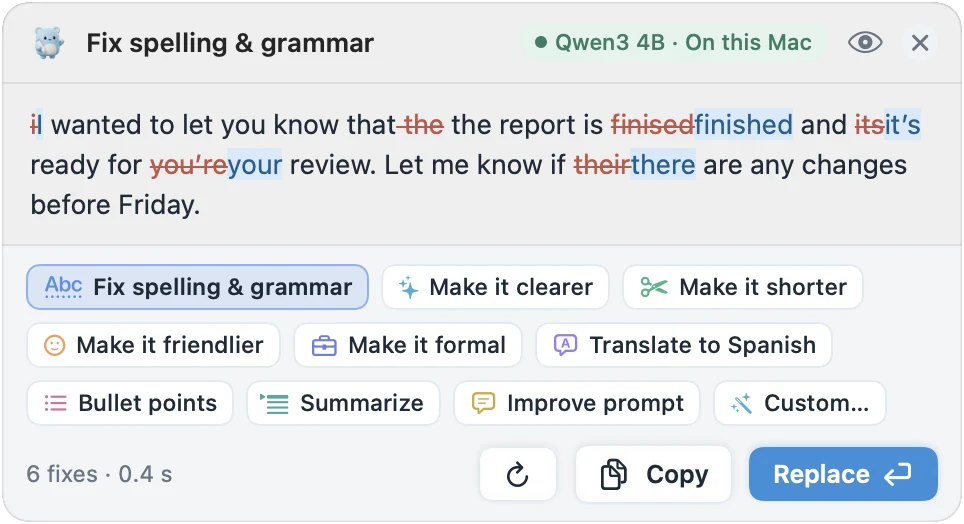
Full disclosure: MacWriteBuddy is ours, so weigh this section accordingly. It brings the local-model idea to every app: select text anywhere, press ⌃⌥G, check the preview, and the fixed version replaces it. It can use a small model on your Mac (fully offline), Apple Intelligence on macOS 26 or later, your own Ollama or LM Studio server, or your own key for OpenAI, Anthropic, Google Gemini, and 13 more providers.
MacWriteBuddy has no server that receives your writing. With a local model, nothing leaves your Mac; with a cloud provider, your text goes straight to that provider (which does see it) under your own key. It reads only the text you select, when you press the shortcut, and always skips password fields. Spelling and grammar fixes are free forever, with no account; Pro adds rewrites, Summarize, and Improve prompt for a one-time $39 (usually $79).
Limits: it doesn’t underline mistakes as you type (you ask for each fix), it’s Mac only, and it needs macOS 14 or later. On macOS 27 with Apple Intelligence, the built-in proofreading may be all you need. MacWriteBuddy fits best on macOS 14 to 26, on Intel Macs, or when you want to pick the model and keep your writing local.
When Grammarly is still the better choice
Switching isn’t always the right call. Grammarly is likely the better fit if:
- You write on more than a Mac. Grammarly has apps for Windows, Mac, iPhone, iPad, and Android, extensions for Chrome, Safari, Firefox, and Edge, and add-ins for Microsoft Office and Google Docs. Apple’s tools and MacWriteBuddy stay on Apple devices or the Mac.
- You want suggestions as you type, everywhere. Grammarly checks continuously across apps and websites. Apple’s proofreading needs macOS 27 and Apple silicon, and on-demand tools only check what you select.
- Your team shares a style guide. Grammarly says Pro and Enterprise plans include team features “such as style guides, brand tones, and more.”
- Your company already buys it. Enterprise accounts, and Pro or Business plans bought through Grammarly’s sales team, start with product improvement and training switched off.
- You want one tool for everything. Grammar, tone, and AI drafting in one place, with nothing to set up and no models to choose.
How to choose a Grammarly alternative for your Mac
Work through these in order:
- Which Mac do you have? On an M1 or later Mac with macOS 27, try Apple’s built-in proofreading first; it costs nothing. On an Intel Mac, skip Apple Intelligence and look at Harper, LanguageTool, Grammarly, or an on-demand tool.
- Do you need underlines as you type? If yes: Apple’s proofreading, Harper, LanguageTool, or Grammarly. If you’d rather fix text when you’re done: a local model or MacWriteBuddy.
- Where can your words go? For client, health, or legal writing, prefer a tool that checks on your Mac (Harper, or a local model for offline grammar checking), or a business plan with training off.
- Which languages? Harper is English only, Apple Intelligence supports 16 languages, and LanguageTool covers 30+.
- Subscription or not? Harper and Apple’s tools are free, ProWritingAid sells a lifetime plan, and MacWriteBuddy’s grammar fixes are free, with Pro as a one-time payment.
For a fuller checklist, read our guide on how to choose the best grammar checker for Mac. If MacWriteBuddy sounds right, you can download it free and try the grammar fixes in your own apps.
Sources
- Grammarly: Plans (as of October 2026)
- Mac App Store (US): Grammarly: AI Writing App, in-app purchases
- Grammarly Support: System requirements for Grammarly for Mac
- Grammarly Support: Can I use Grammarly offline?
- Grammarly Support: Product Improvement and Training controls
- Grammarly: apps and platforms
- Grammarly Business: Style guides
- Engadget: Grammarly has rebranded to Superhuman (Oct 29, 2025)
- Apple Newsroom: Siri AI is here (Sep 14, 2026)
- Apple Support: Use Writing Tools on Mac
- Apple Support: How to get Apple Intelligence
- Apple: Apple Intelligence and privacy
- Apple Support: Check spelling and grammar on Mac
- MacStories: macOS 27, the MacStories review
- MacRumors: macOS 27 Golden Gate release date and Intel support
- LanguageTool for macOS
- LanguageTool: Premium
- ProWritingAid: Desktop Everywhere for Mac
- ProWritingAid: Pricing
- Harper: privacy-first offline grammar checker
- Harper Desktop for macOS
- Ollama docs: macOS
- Ollama docs: FAQ
- LM Studio: System requirements